The legacy “MBR” partitioning scheme limits the number of drives to four and, on some older virtual machines, I fell into a trap of expanding LVMs by adding more physical volumes. This was not an issue until I went to reboot the machine and it failed.
Note – all of the below was performed on a production system without service interruption. There are easier ways of doing this if the server could be taken offline.
Here was the problem:
root@vm01:/root# pvs -o+pv_used
  PV         VG   Fmt  Attr PSize   PFree Used
  /dev/xvda1 sys  lvm2 a--  <10.00g    0  <10.00g
  /dev/xvdb1 data lvm2 a--  <30.00g    0  <30.00g
  /dev/xvdc1 data lvm2 a--  <50.00g    0  <50.00g
  /dev/xvde1 data lvm2 a--  <50.00g    0  <50.00g
  /dev/xvdf1 data lvm2 a--  <50.00g    0  <50.00g
  /dev/xvdg1 data lvm2 a--  <60.00g    0  <60.00g
I ended up with six physical volumes. My “data” volume group spanned xvdb through xvdg (five PVs). To resolve this, my plan was to add a seventh (!), move xvdb’s data there, then replace xvdb with a much larger volume and then move everything from xvdc, xvde, xvdf, xvdg to the new xvdb.
First, I extended the data VG by adding a new PV xvdh1 at 31G (just an extra 1G to ensure I would have no issues moving xvdb’s 30G over). I then moved the data out of xvdb via:
# # reduce the data VG by removing xvdb1 # vgreduce data /dev/xvdb1
# # finally, remove the PV itself pvremove /dev/xvdb1
On the hypervisor (Xenserver / XCP-ng) in my case, I resized the underlying virtual drive for xvdb by deactivating it, resizing it, and re-activating it. Then on the virtual machine, I used cfdisk to resize it to use the additional space. (If it’s a GPT partition, this may help). Then:
# # create a new PV
# pvcreate /dev/xvdb1

# # extend the data VG to use the new PV
# vgextend data /dev/xvdb1
Then, for each of xvdh1, xvdg1, xvdf1, xvde1, and xvdc1 (denoted as xvdX below) do the following:
# # move data off xvdX
# pvmove /dev/xvdX

# # reduce the data VG by removing xvdX
# vgreduce data /dev/xvdX

# # reduce the data VG by removing xvdX
pvremove /dev/xvdX
Then, on the hypervisor, remove these hard drives from the virtual machine leaving only xvda and the much enlarged xvdb.
We are now close to releasing IXP Manager v7, and it has become apparent that the single documentation site is suboptimal and confusing for people who have not upgraded but are reading about newer features. The best solution for this is to introduce major.minor versioning on the documentation site.
Material supports versioning via another tool called mike. For a new site, this is quite easy to set up and run, but we had to do the following for an existing site.
Quick side note: we are using a Python venv for mkdocs, mike, etc. and not installing system wide. One thing to watch out for is that mike calls mkdocs but this may not be in your path. This can be solved by updating the PATH environment variable or running mike as follows:
PATH=./venv/bin:$PATH mike deploy --push --update-aliases 7.0 dev
Install mike per its and Material’s documentation.
Delete the old documentation site: mike delete --all
Deploy your current docs as the latest version: mike deploy --push --update-aliases 6.4 latest
Deploy the docs you are working on for the upcoming version as the dev tag: mike deploy --push --update-aliases 7.0 dev
Set the default docs: mike set-default --push latest
We were using a custom CNAME for Github pages and a custom 404 page. These would have been removed with step (2) above but are both available in your documentation’s Githib repo under the gh-pages branch history. To restore these you need to place them back in the root folder of the gh-pages branch:
The standard Ubuntu versions go EOL quite quickly and it’s easy to miss the upgrade window such that running do-release-upgrade yields:
An upgrade from 'groovy' to 'impish' is not supported with this tool.
In this example, Ubuntu is looking to upgrade from 20.10 to 21.10 skipping 21.04 which is not supported. You’ve probably also reached a situation where you cannot even upgrade your current packages as the repositories have also been EOL’d and do not exist.
To upgrade step-wise, we need to upgrade our current platform first. You need to be logged in as root or using sudo for all of the following.
Start by changing your mirror in /etc/apt/sources.list to use old-releases.ubuntu.com. For example, in my case my mirror was ie.archive.ubuntu.com and so I can replace that via:
sed -i -e 's/ie.archive.ubuntu.com/old-releases.ubuntu.com/g' /etc/apt/sources.list
Once that’s done, upgrade your current system as usual:
apt-get update
apt-get dist-upgrade
shutdown -r now
Now that your current system is up-to-date, we need to do a distribution upgrade to 21.04 hirsute (in my case). do-release-upgrade will still not work so we need to manually download the upgrade tool and run that ourselves. Find the appropriate UpgradeTool file from Ubuntu’s meta-release page here. In my case the appropriate upgrade file was hirsute.tar.gz and I downloaded that via:
mkdir hirsute_files
cd hirsute_files
tar zxf ../hirsute.tar.gz
./hirsute
If you’re as fortunate as me, this will run cleanly just as it would have via do-release-upgrade. If you have no more intermediary versions, you can do the final upgrade via do-release-upgrade as normal. Remember also that upgrading from one LTS version to another is also supported by that tool.
webpack.mix.js – Alpine.js has an idiosyncrasy which causes issues for jQuery – it is loaded via <script src="" defer> – emphasis on the defer. This means that jQuery won’t be available for your scripts within the Blade templates and, specifically, $(document).ready() will throw an exception because the jQuery function, $, will not be defined as yet. To solve this, we create a second new js file by adding the following line:
mix.js( "resources/js/alpine.js", "public/js" )
resources/js/app.js – we need to remove the Alpine.js lines from here and place them in a new file, resources/js/alpine.js. Specifically – move the following lines:
import Alpine from 'alpinejs';
window.Alpine = Alpine;
Alpine.start();
resources/js/bootstrap.js – I added the following bolded lines:
window._ = require('lodash');

/**
 * We'll load jQuery and the Bootstrap jQuery plugin which provides
 * support for JavaScript based Bootstrap features such as modals
 * and tabs. This code may be modified to fit the specific needs of
 * your application.
 */

window.$ = window.jQuery = require('jquery');


// Datatables
window.DataTable = require('datatables.net-dt');

...
Lastly, edit the template to not defer app.js and to load your new alpine.js file. In resources/views/layouts/app.blade.php, remove the script line for app.js and replace it with the following two lines:
I think the biggest confusion here was that there were no changes required to webpack.mix.js specifically for DataTables despite many online resources making changes there. Perhaps it was earlier versions of Mix? The second confusing issue was Alpine.js and the effects of ‘defer’ring app.js.
With the above, DataTables (and jQuery) are now available as usual in your Blade templates:
Legacy installations of IXP Manager can be very difficult to upgrade as you can find yourself in a dependency nightmare whereby the old version of IXP Manager will not run on modern versions of PHP; and vice versa.
In case you missed it, we have a new modern website for IXP Manager – find it at https://www.ixpmanager.org/. One of the features of this new website is that we now gather IXP Manager usage statistics on a daily basis – including the distribution of versions in use.
Reassuringly, of the installs we can poll for version used, ~65% are using one of the latest three minor versions (5.5.0 – 5.7.0). This is reassuring for a number of reasons including: knowing that IXPs stay current; knowing that IXPs are concerned about security updates; and knowing that the upgrade process is not especially difficult.
Of the 145 installs we know about, we can poll 116 and collect the version is use which yields the following table:
5.x.y
83
4.x.y
26
3.x.y
7
Distribution of major IXP Manager versions in use as at September 8th 2020.
Legacy installations of IXP Manager can be very difficult to upgrade as you can find yourself in a dependency nightmare whereby the old version of IXP Manager will not run on modern versions of PHP; and vice versa.
Community IX Atlanta (CIX-ATL) are in the process of upgrading from 4.9.3 to the latest (5.7.0) and they graciously allowed me to record the process:
The video is a real-life experience where it wasn’t planned in advance allowing the viewer to see the mistakes and thought processes throughout. Also, if you weren’t aware of it, we have an on-going series of IXP Manager tutorials here.
When considering a legacy upgrade, there are two main approaches:
Build a new IXP Manager installation on a new (modern) server and migrate the database (this is what we’ve done here).
Attempt an in place upgrade alternating between IXP Manager upgrades and operating system upgrades. This is probably more awkward with more scope for issues to crop up (especially on non-IXP Manager applications which may be on the same server).
Remember, what’s covered here is “just” the IXP Manager and database upgrade. There’s a bunch of other things that would also need to be done including:
Working through the various upgrade actions in the release notes (mentioned throughout the video). Essentially you’ll need to step through each set of release notes for the versions you cycle through (and jump over).
If building a new server, pointing elements such as route server cron jobs and other API consumers at the new server.
Migrating other applications from the legacy server (e.g. maybe you have mrtg co-installed there).
In a production environment, my goal would be to build the new IXP Manager installation with the copied and upgraded database and run them in parallel. NB: either avoid or duplicate changes made in the UI across both installations of IXP Manager for this period of time.
Once the new installation of IXP Manager is ready for production use, you will then step through all external tools that consume data from it (sflow, mrtg, route servers, route collectors, etc.) and migrate them to the new installation. Sometimes simply updating DNS can achieve most of this but you’ll probably want to take it piece-meal and ensure each external service works as expected.
Take particular care with essential services such as route servers. This is an opportune time to upgrade to Bird v2 and add RPKI. What we did at INEX was do one route server at a time with 1-2 weeks between upgrades. This allowed time to ensure the new system was stable and also to ensure no member issues due to RPKI filtering, etc. (spoiler alert: it was uneventful!).
As you complete the migration, you can also consider if some services should be left on the “old” server. Separating tasks between different servers is good practice and so ask youself if everything should be migrated over to the new server.
More than anything, I hope this video entices you to keep current with your IXP Manager installations!
We call IXP Manager’s statistics and graphing architecture Grapher. It’s a backend agnostic way to collect and present data. Out of the box, we support MRTG for standard interface graphs, sflow for peer to peer and per-protocol graphs, and Smokeping for latency/packet loss graphs. You can see some of this in action on INEX’s public statistics section.
Internet Exchange Points (IXPs) play a significant role in national internet infrastructures and IXP Manager is used in nearly 100 of these IXPs worldwide. In the last couple weeks we have got a number of queries from those IXPs asking for suggestions on how they can extract traffic data to address queries from their national Governments, regulators, media and members. We just published our own analysis of this for traffic over INEX here.
Grapher has a basic API interface (documented here) which we use to help those IXP Manager users address the queries they are getting. What we have provided to date are mostly quick rough-and-ready solutions but we will pull all these together over the weeks (and months) to come to see which of them might be useful permanent features in IXP Manager.
How to Use These Examples
The code snippets below are expected to be placed in a PHP file in the base directory of your IXP Manager installation (e.g. /srv/ixpmanager) and executed on the command line (e.g. php myscript.php).
Each of these scripts need the following header which is not included below for brevity:
We’ve placed a working API endpoint for INEX above – change this for your own IXP / scenario.
Data Volume Growth
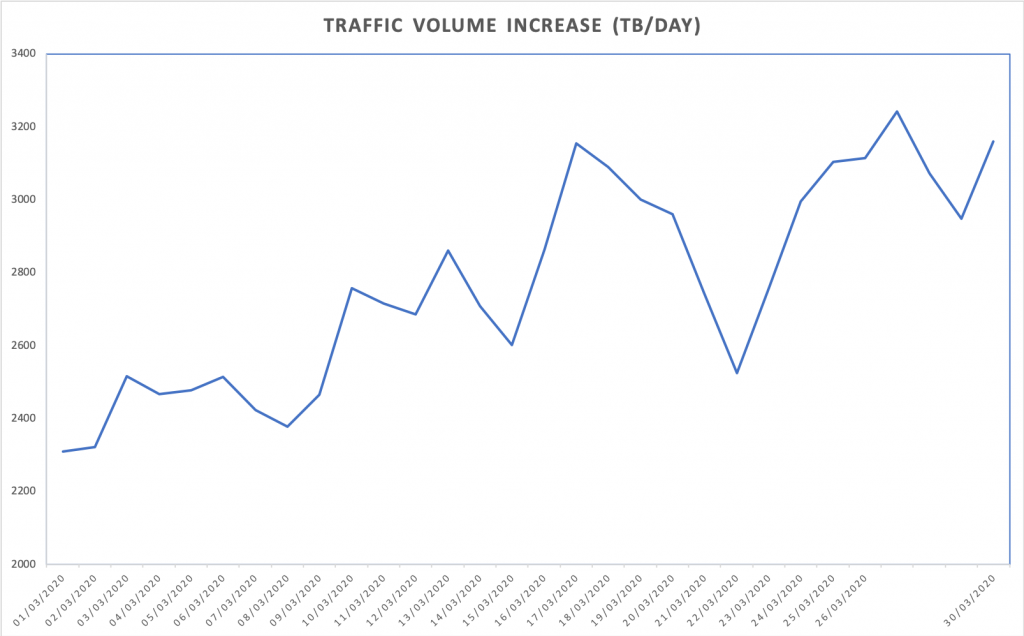
An IXP was asked by their largest national newspaper to provide daily statistics of traffic growth due to COVID-19. For historical reasons linked to MRTG graph images, the periods in IXP Manager for this data is such that: day is last 33.3 hours; week is last 8.33 days; month is last 33.33 days; and year is last 366 days.
This is fine within IXP Manager when comparing averages and maximums as we are always comparing like with like. But if we’re looking to sum up the data exchanged in a proper 24hr day then we need to process this differently. For that we use the following loop:
$start = new Carbon('2020-01-01 00:00:00');
$bits = 0;
$last = $data[0][0];
$startu = $start->format('U');
$end = $start->copy()->addDay()->format('U');

foreach( $data as $d ) {
  // if the row is before our start time, skip
  if( $d[0] < $startu ) { $last = $d[0]; continue; }

  if( $d[0] > $end ) {
    // if the row is for the next day break out and print the data
    echo $start->format('Y-m-d') . ','
        . $bits/8 / 1024/1024/1024/1024 . "\n";

    // and reset for next day
    $bits  = $d[1] * ($d[0] - $last);
    $startu = $start->addDay()->format('U');
    $end    = $start->copy()->addDay()->format('U');
  } else {
    $bits += $d[1] * ($d[0] - $last);
  }

  $last = $d[0];
}
The output is comma-separated (CSV) with the date and data volume exchanged in that 24 hour period (in TBs via 8/1024/1024/1024/1024). This can, for example, be pasted into Excel to create a simple graph:
The elements of the $d[] array mirror what you would expect to find in a MRTG log file (but the data unit represents the API request – e.g. bits/sec, pkts/sec, etc.):
d[0] – the UNIX timestamp of the data sample.
$d[1] and $d[2] – the average incoming and outgoing transfer rate in bits per second. This is valid for the time between the $d[0] value of the current entry and the $d[0] value of the previous entry. For an IXP where traffic is exchanged, we expect to see $d[1] roughly the same as $d[2].
$d[3] and $d[4] – the maximum incoming and outgoing transfer rate in bits per second for the current interval. This is calculated from all the updates which have occured in the current interval. If the current interval is 1 hour, and updates have occured every 5 minutes, it will be the biggest 5 minute transfer rate seen during the hour.
Traffic Peaks
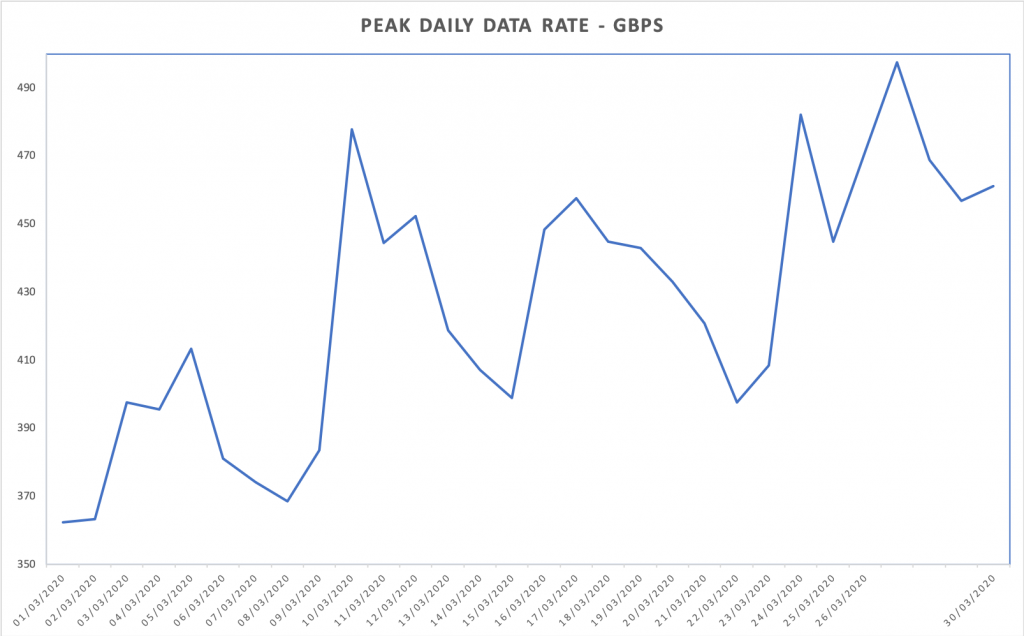
The above snippet uses the average traffic values and the time between samples to calculate the overall volume of traffic exchanged. If you just want to know the traffic peaks in bits/sec on a daily basis, you can do something like this:
The output is comma-separated (CSV) with the date and data volume exchanged in that 24 hour period (in Gbps via 1000/1000/1000). This can also be pasted into Excel to create a simple graph:
Import to Carbon / Graphite / Grafana
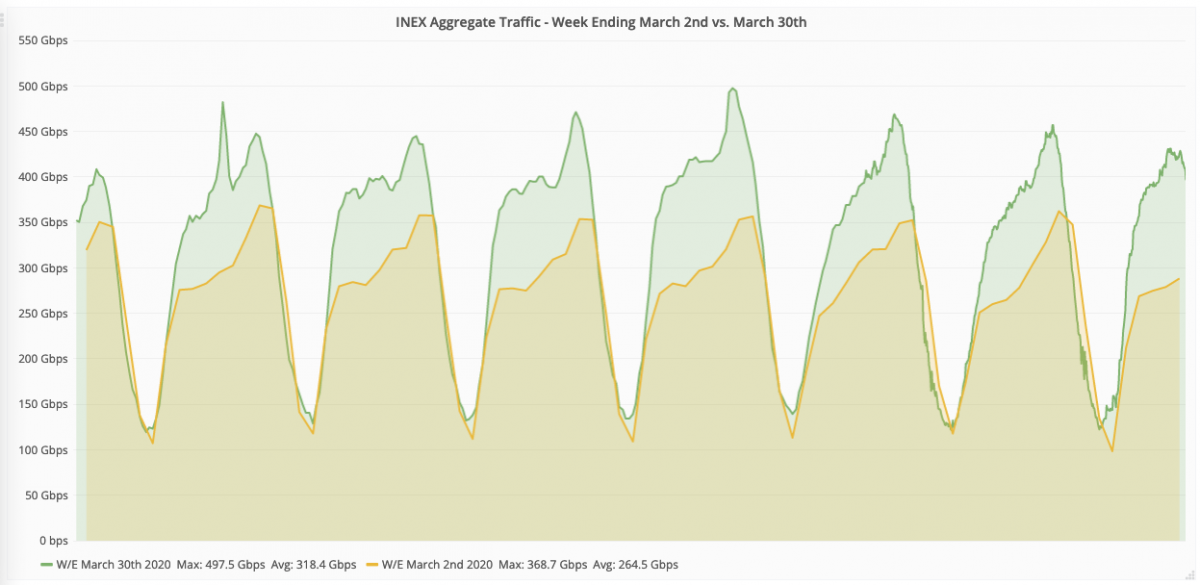
Something that is on our development list for IXP Manager is to integrate Graphite as a Grapher backend. Using this stack, we could create much more visually appealing graphs as well as time-shift comparisons. In fact this is how we created the graphs for this article on INEX’s website which includes graphs such as:
To create this, we need to get the data into Carbon (Graphite’s time-series database). Carbon accepts data via UDP so we used a script of the form:
The Carbon / Graphite / Grafana stack is quite complex so unless you are familiar with it, this option for graphing could prove difficult. To get up and running quickly, we used the docker-grafana-graphite Docker image. Beware that the default graphite/storage-schemas.conf in this image limits data retention to only 7 days.
There’s a very interesting package called calebporzio/sushi for Laravel that allows one to use arrays as Eloquent drivers / sources of data. @calebporzio posted his own example of using this to front API results here.
It’s a very interesting proof of concept for this use case (probably needs more work and more knobs for production use). So interesting, I had a quick look myself with a bare bones Laravel app:
$ laravel new test-sushi
$ cd test-sushi
$ composer require calebporzio/sushi
$ composer require kitetail/zttp
$ php artisan make:model IxpdbProviders
The only interesting part of the model, IxpdbProviders, is the getRows() function:
the array_map() which is required to remove sub-arrays (sub-objects) within the response as Sushi requires flat rows.
Using Zttp out of curiosity rather than Guzzle directly.
Sushi then takes the array of IXPs (the result of the API call) and stores these in a dedicated in-memory Sqlite database for the duration of the request.
We can now query this as if it were a typical database table:
We’ve just released IXP Manager v5.3.0. The headline feature in this release is two-factor authentication (2fa) and user session management. This blog post overviews the PHP elements on how we did that.
While IXP Manager is a Laravel framework application, it uses Doctrine ORM as its database layer via the Laravel Doctrine bridge. For those curious, this really is a carry over from when IXP Manager was a Zend Framework application. For the migration, we concentrated on the controller and view elements of the MVC stack leaving the model layer on Doctrine. Over time we’ll probably migrate the model layer over to Laravel’s Eloquent.
Before reading on, it would be useful to first read the official documentation we have written aroud 2fa and user session management:
Hopefully the how we did this will be useful for anyone else in the same boat or even just trying to understand the Laravel authentication stack.
Two factor authentication (2fa) strengthens access security by requiring two methods (also referred to as factors) to verify your identity. Two factor authentication protects against phishing, social engineering and password brute force attacks and secures your logins from attackers exploiting weak or stolen credentials.
User session management allows a user to be logged in and remembered from multiple browsers / devices and to manage those sessions from within IXP Manager.
For 2fa, we used the antonioribeiro/google2fa-laravel package which is built on antonioribeiro/google2fa. If we were 100% in Laravel’s eco-system the would have been easier but because we use Doctrine, we needed to override a number of classes.
Structurally we need a database table to indicate if a user has 2fa enabled and to hold their 2fa secret – for this we created Entities\User2FA. Similarly, we have a controller to handle the UI interaction of enabling, configuring and disabling 2fa: User2FAController – this also includes generating QR codes for the typical 2fa activation process.
On the user session management side, we created Entities\UserRememberToken to hold multiple tokens per user (rather than Laravel’s default single token in a column in the user’s user database entry. For the frontend UI, UserRememberTokenController allows a user to view their active sessions and invalidate (delete) them if required.
The actual mechanism of enforcing 2fa is via middleware: IXP\Http\Middleware\Google2FA. This is added, as appropriate, to web routes via the RouteServiceProvider. This will check the user’s session and if 2fa is enabled but has not been completed, then the middleware will enforce 2fa before granting access to any routes covered by it.
Note that because we also implemented user session management via long-lived cookies and because the fact that a user has passed 2fa or not is held in the session, we need to persistently store the fact in the user’s specific remember token database entry. This is done via the Google2FALoginSucceeded listener. This is then later checked in the SessionGuard – where, if we log a user in via the long-lived cookie, we also make them as having passed 2fa if so set.
Speaking of the SessionGuard, this was one of the bigger changes we had to make – we overrode the Illuminate\Auth\SessionGuard as we needed to replace a few functions to make 2fa and user session management work. We have kept these to a minimum:
The user() function – Laravel’s long lived session uses a single token but we require a token per device / browser. We also need to side-step 2fa for existing sessions as discussed above and allow for features such as allowing a user to delete other long-lived sessions and to provide functionality to allow these sessions to expire.
The above constitutes a bulk to the changes. Because 2fa can be enforced via middleware, it doesn’t really touch the core Laravel authentication process. The user session management was more invasive and responsible for the bulk of the changes required in the DoctrineUserProvider and SessionGuard.
Ubuntu 18.04 ships with PHP 7.2 by default but there are various reasons why you may wish to upgrade to newer versions. For example, active support for it ends later this year – far sooner than the 2023 support window for the OS.
In addition, applications will be released that will require newer versions in that 2018 – 2023 window. For IXP Manager, we are releasing v5 this month and mandating PHP 7.3 support. We do this to stay current and to prevent developer apathy – insisting on legacy frameworks and packages that have been EOL’d provides a major stumbling block for bringing on new developers and contributors. There’s also a real opportunity cost – I have a couple free hours, will I work on project A or project B? If project A uses an old stale toolchain where everything is that much more awkward that project B then which would you choose?
So, from a typical LAMP stack install of Ubuntu 18.04, you’ll find something like the following packages for PHP:
root@ubuntu:/var/www/html# dpkg -l | grep php | cut - -b 1-65
 ii  libapache2-mod-php                    1:7.2+60ubuntu1
 ii  libapache2-mod-php7.2                 7.2.17-0ubuntu0.18.04.1
 ii  php-common                            1:60ubuntu1
 ii  php-mysql                             1:7.2+60ubuntu1
 ii  php7.2-cli                            7.2.17-0ubuntu0.18.04.1
 ii  php7.2-common                         7.2.17-0ubuntu0.18.04.1
 ii  php7.2-json                           7.2.17-0ubuntu0.18.04.1
 ii  php7.2-mysql                          7.2.17-0ubuntu0.18.04.1
 ii  php7.2-opcache                        7.2.17-0ubuntu0.18.04.1
 ii  php7.2-readline                       7.2.17-0ubuntu0.18.04.1
Obviously your exact list will vary depending on what you installed. I find the easiest way to upgrade is to start by removing all installed PHP packages. Based on the above:
The goto place for current versions of PHP on Ubuntu is OndÅ™ej Surý’s PPA (Personal Package Archive). OndÅ™ej maintains this in his own time so don’t be afraid to tip him here.
It’s easy to add this to 18.04 as follows:
add-apt-repository ppa:ondrej/php
apt-get update
Then install the PHP 7.3 packages you want / need. For example we can just take the package removal line above and install the 7.3 equivalents with:
I’ve always been a bash user but I’ve recently decided to give zsh a while. It has some pretty useful features such as path expansion and replacement (see this slideshare). And yes, I’m well aware of bash-completion thank you very much.
It also has a nice eco system of expansions including oh-my-zsh with which I’m using plugins for git, composer (php), laravel5, brew, bower, vagrant, node and npm. I went with the agnoster theme and for iTerm2 (my terminal application of choice) I installed the Solarized Dark and Light themes. Both work well with the agnoster theme. I also installed and use the Meslo font.
One issue I did find immediately is things like file type colourisation with ls were not as good as bash. To resolve this, I installed the warhol plugin (as well as brew install zsh-syntax-highlighting grc). Now I find my ls’, ping’s, traceroute’s etc all nicely coloured.
We use Dropbox with work and to keep my work and home office laptops in sync, I moved the configs into Dropbox and symlinked to them:
This all works really well. My bash aliases are fully compatible so I just pull them in at the end of .zshrc (source ~/.bash_aliases). Lastly – to prevent the prompt including my username and hostname on my local laptop, I set the following in .zshrc: