The legacy “MBR” partitioning scheme limits the number of drives to four and, on some older virtual machines, I fell into a trap of expanding LVMs by adding more physical volumes. This was not an issue until I went to reboot the machine and it failed.
Note – all of the below was performed on a production system without service interruption. There are easier ways of doing this if the server could be taken offline.
Here was the problem:
root@vm01:/root# pvs -o+pv_used
  PV         VG   Fmt  Attr PSize   PFree Used
  /dev/xvda1 sys  lvm2 a--  <10.00g    0  <10.00g
  /dev/xvdb1 data lvm2 a--  <30.00g    0  <30.00g
  /dev/xvdc1 data lvm2 a--  <50.00g    0  <50.00g
  /dev/xvde1 data lvm2 a--  <50.00g    0  <50.00g
  /dev/xvdf1 data lvm2 a--  <50.00g    0  <50.00g
  /dev/xvdg1 data lvm2 a--  <60.00g    0  <60.00g
I ended up with six physical volumes. My “data” volume group spanned xvdb through xvdg (five PVs). To resolve this, my plan was to add a seventh (!), move xvdb’s data there, then replace xvdb with a much larger volume and then move everything from xvdc, xvde, xvdf, xvdg to the new xvdb.
First, I extended the data VG by adding a new PV xvdh1 at 31G (just an extra 1G to ensure I would have no issues moving xvdb’s 30G over). I then moved the data out of xvdb via:
# # reduce the data VG by removing xvdb1 # vgreduce data /dev/xvdb1
# # finally, remove the PV itself pvremove /dev/xvdb1
On the hypervisor (Xenserver / XCP-ng) in my case, I resized the underlying virtual drive for xvdb by deactivating it, resizing it, and re-activating it. Then on the virtual machine, I used cfdisk to resize it to use the additional space. Then:
# # create a new PV
# pvcreate /dev/xvdb1

# # extend the data VG to use the new PV
# vgextend data /dev/xvdb1
Then, for each of xvdh1, xvdg1, xvdf1, xvde1, and xvdc1 (denoted as xvdX below) do the following:
# # move data off xvdX
# pvmove /dev/xvdX

# # reduce the data VG by removing xvdX
# vgreduce data /dev/xvdX

# # reduce the data VG by removing xvdX
pvremove /dev/xvdX
Then, on the hypervisor, remove these hard drives from the virtual machine leaving only xvda and the much enlarged xvdb.
We are now close to releasing IXP Manager v7, and it has become apparent that the single documentation site is suboptimal and confusing for people who have not upgraded but are reading about newer features. The best solution for this is to introduce major.minor versioning on the documentation site.
Material supports versioning via another tool called mike. For a new site, this is quite easy to set up and run, but we had to do the following for an existing site.
Quick side note: we are using a Python venv for mkdocs, mike, etc. and not installing system wide. One thing to watch out for is that mike calls mkdocs but this may not be in your path. This can be solved by updating the PATH environment variable or running mike as follows:
PATH=./venv/bin:$PATH mike deploy --push --update-aliases 7.0 dev
Install mike per its and Material’s documentation.
Delete the old documentation site: mike delete --all
Deploy your current docs as the latest version: mike deploy --push --update-aliases 6.4 latest
Deploy the docs you are working on for the upcoming version as the dev tag: mike deploy --push --update-aliases 7.0 dev
Set the default docs: mike set-default --push latest
We were using a custom CNAME for Github pages and a custom 404 page. These would have been removed with step (2) above but are both available in your documentation’s Githib repo under the gh-pages branch history. To restore these you need to place them back in the root folder of the gh-pages branch:
A common way to affect such a migration is to use mysqldump to extract the data from MariaDB and then to insert it into MySQL.
Assuming a reasonably simply situation, there will be some incompatibilities in the dump that are easily sorted:
sed -i 's/ENGINE=Aria/Engine=InnoDB/g' dump.sql
sed -i 's/PAGE_CHECKSUM=1//g' dump.sql
sed -i 's/TRANSACTIONAL=1//g' dump.sql
sed -i 's/PAGE_CHECKSUM=0//g' dump.sql
sed -i 's/TRANSACTIONAL=0//g' dump.sql
sed -i 's/ROW_FORMAT=PAGE//g' dump.sql
sed -i 's/ROW_FORMAT=FIXED//g' dump.sql
The dreaded Linux server that does not start up after a reboot. There are many online articles on how to fix this but there is also a simple solution that has worked for me.
Boot into the system using a rescue CD / rescue mode on a standard Linux install CD and allow it to mount and chroot you into the server’s root file system:
# mkdir /mnt/a
# mount --bind /proc /mnt/a/proc
# mount --bind /dev /mnt/a/dev
# mount --bind /sys /mnt/a/sys
# chroot /mnt/a
# bash
The following versions of PHP ship as standard with the referenced LTS versions of Ubuntu. See Ondrej Sury’s defacto standard PPA to install other versions.
The standard Ubuntu versions go EOL quite quickly and it’s easy to miss the upgrade window such that running do-release-upgrade yields:
An upgrade from 'groovy' to 'impish' is not supported with this tool.
In this example, Ubuntu is looking to upgrade from 20.10 to 21.10 skipping 21.04 which is not supported. You’ve probably also reached a situation where you cannot even upgrade your current packages as the repositories have also been EOL’d and do not exist.
To upgrade step-wise, we need to upgrade our current platform first. You need to be logged in as root or using sudo for all of the following.
Start by changing your mirror in /etc/apt/sources.list to use old-releases.ubuntu.com. For example, in my case my mirror was ie.archive.ubuntu.com and so I can replace that via:
sed -i -e 's/ie.archive.ubuntu.com/old-releases.ubuntu.com/g' /etc/apt/sources.list
Once that’s done, upgrade your current system as usual:
apt-get update
apt-get dist-upgrade
shutdown -r now
Now that your current system is up-to-date, we need to do a distribution upgrade to 21.04 hirsute (in my case). do-release-upgrade will still not work so we need to manually download the upgrade tool and run that ourselves. Find the appropriate UpgradeTool file from Ubuntu’s meta-release page here. In my case the appropriate upgrade file was hirsute.tar.gz and I downloaded that via:
mkdir hirsute_files
cd hirsute_files
tar zxf ../hirsute.tar.gz
./hirsute
If you’re as fortunate as me, this will run cleanly just as it would have via do-release-upgrade. If you have no more intermediary versions, you can do the final upgrade via do-release-upgrade as normal. Remember also that upgrading from one LTS version to another is also supported by that tool.
webpack.mix.js – Alpine.js has an idiosyncrasy which causes issues for jQuery – it is loaded via <script src="" defer> – emphasis on the defer. This means that jQuery won’t be available for your scripts within the Blade templates and, specifically, $(document).ready() will throw an exception because the jQuery function, $, will not be defined as yet. To solve this, we create a second new js file by adding the following line:
mix.js( "resources/js/alpine.js", "public/js" )
resources/js/app.js – we need to remove the Alpine.js lines from here and place them in a new file, resources/js/alpine.js. Specifically – move the following lines:
import Alpine from 'alpinejs';
window.Alpine = Alpine;
Alpine.start();
resources/js/bootstrap.js – I added the following bolded lines:
window._ = require('lodash');

/**
 * We'll load jQuery and the Bootstrap jQuery plugin which provides
 * support for JavaScript based Bootstrap features such as modals
 * and tabs. This code may be modified to fit the specific needs of
 * your application.
 */

window.$ = window.jQuery = require('jquery');


// Datatables
window.DataTable = require('datatables.net-dt');

...
Lastly, edit the template to not defer app.js and to load your new alpine.js file. In resources/views/layouts/app.blade.php, remove the script line for app.js and replace it with the following two lines:
I think the biggest confusion here was that there were no changes required to webpack.mix.js specifically for DataTables despite many online resources making changes there. Perhaps it was earlier versions of Mix? The second confusing issue was Alpine.js and the effects of ‘defer’ring app.js.
With the above, DataTables (and jQuery) are now available as usual in your Blade templates:
Over at INEX, we released v6.0.0 of IXP Manager last month. At this point, the platform is supporting 175 exchange points around the world.
One of the biggest changes in v6 relates to a significant framework change – Doctrine ORM has been completely removed and replaced with Laravel’s Eloquent. This work is thanks to @yannrobin who has done all the heavy-lifting on rewriting all database-related code within the project over the past few months. Using Eloquent, which is a key component of Laravel and integrates fully with the framework, should allow us to develop new features with greater ease and speed.
I was delighted to help celebrate Euro-IX’s 20th anniversary today by giving a talk on Our Community and IXP Manager. My goal was to show that collaboration is a two-way street with IXP Manager by taking a look at how our community has helped the project and reflect on how the project helps our community.
I was delighted to help celebrate Euro-IX’s 20th anniversary today by giving a talk on Our Community and IXP Manager. My goal was to show that cooperation is a two-way street with IXP Manager by taking a look at how our community has helped the project and reflect on how the project helps our community. The event was of course online and you can find full details here: Euro-IX – 20 Years of Cooperation.
Euro-IX is my favourite event in our industry and I attended my first one on behalf of INEX when it was in Rome in 2009, accompanying the late Barry Rhodes. Since then, I’ve attended at least one of the two every year.
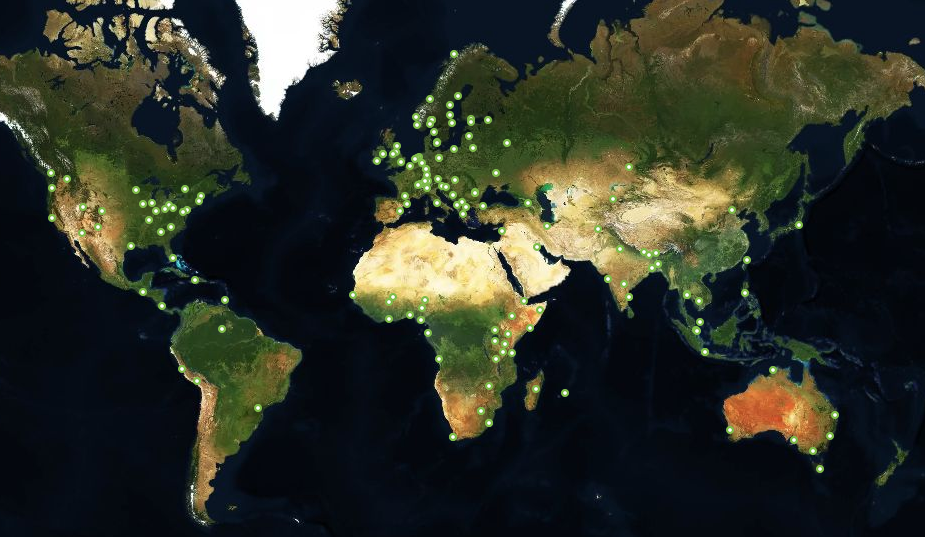
I began with a brief update on the current status of the IXP Manager project. An image I and the team at INEX take great pride in sharing is the following world view with 166 green dots – each dot representing an IXP that uses IXP Manager.
We, INEX and the IXP Manager project, launched a new website in June 2020. This site has a database backend that stores the 166 IXPs noted above and generates the above image dynamically. On a nightly basis, it also polls these IXPs in one of two ways:
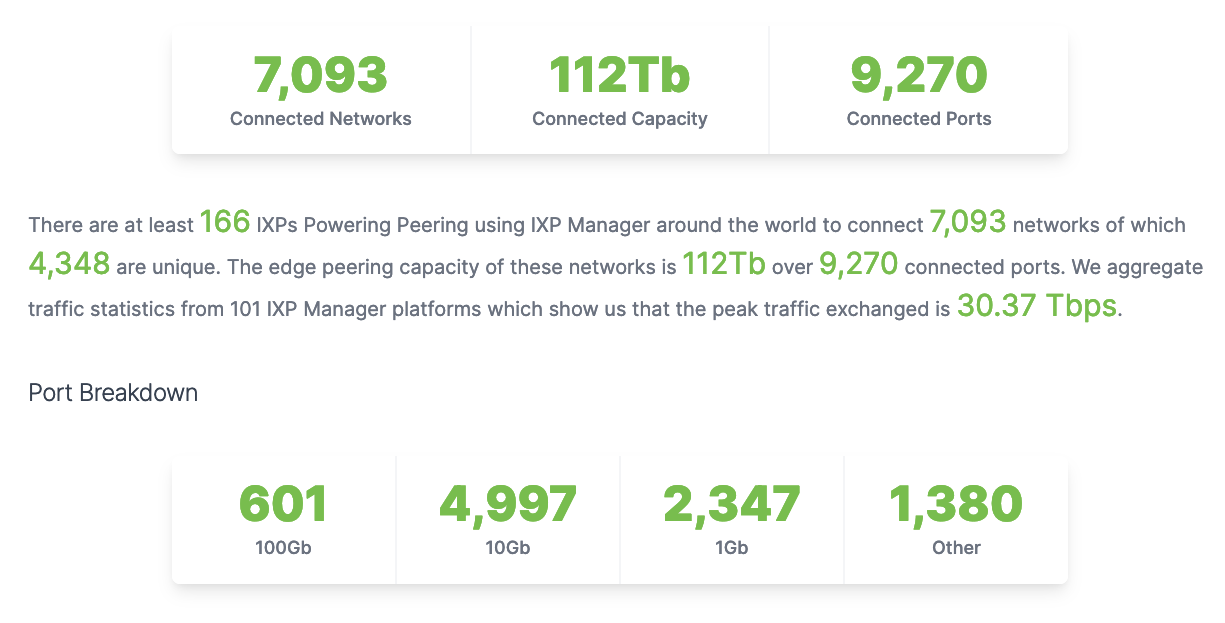
If the IX-F Member Export is enabled and publically available, we will pull the current data from this. This is the case for 98 of the 166 and this data is real-time and accurate.
For the rest, we’ll use PeeringDB which requires networks (members of IXPs) to assert that they peer at an exchange and so these numbers will be a significant undercount.
The resulting stats, as of 27th June 2021, were presented next:
Now we’re getting into the meat of the presentation by looking at some of the things that the Euro-IX – and wider – community give IXP Manager. The first tangible item is community contributions which mostly cover the costs of a full-time developer. This program is currently in its fifth year. Rather than repeating what I said, please see this page on the website for details.
The next slide was about knowledge. This is possibly an under-discussed and under-valued aspect of Euro-IX in general. Knowledge is a very valuable commodity in most industries that is aggressively protected with NDAs, patents, and contracts. Yet, at Euro-IX forums, the operators of IXPs come together to learn; to create knowledge; and to share knowledge – openly and freely. The best of this community knowledge gets distilled into IXP Manager which, as we always say, teaches and implements best practices – and these practices have in part come from this creation and sharing.
One of the things I’m most proud of in our new IXP Manager website is the contributor wall of fame. Anyone who makes at least five contributions to the project through the GitHub platform will appear here which, as of today’s date, has just over 40 people. Any of the following will count towards a contribution:
Possibly the hardest: contribute code through a pull request.
Open an issue (bug report or feature request).
Simply comment on an existing issue (or your own!).
Contribute editorial fixes/content to the documentation.
This section was rounded out with a shortlist of other sources of community collaboration. The first was the coffee breaks between sessions and the conversations over drinks at the socials at Euro-IX forums. These relaxed environments allowed for more long-form free-flowing discussions with IXP Manager users to help flesh out potential features and to understand where the problems, grit, and rough edges exist. The information learned from these conversations then feeds into later versions of IXP Manager. I miss these face-to-face engagements and, hopefully, we can get back to them soon.
Finally, I wanted to give a specific mention to the open-source community in general. Before I was ever involved in IXPs, INEX, or IXP Manager, I had (and continue to have) an involvement in other open-source projects. For IXP Manager, the FOSS community has given us wide-ranging tools from the PHP language itself to Laravel – the web application framework we use, and right through to front-end libraries such as TailwindCSS and jQuery.
Of course, when we mention open-source in the IXP community, we have to give a nod to Bird, the internet routing daemon, which is the powerhouse of so many of our route server implementations. Hopefully, we’ll also find the time in 2021 to add OpenBGPd support to IXP Manager.
IXP Manager – Giving to Our Community
The is the other side of the two-way street and I wanted to touch on some of the things we hope IXP Manager gives our community. This isn’t about new releases, or functionality or features. And it’s not about being boastful or giving ourselves a pat on the back. It’s aspirational – it’s about what we think – what we hope – IXP Manager gives the community. It’s also not something we can claim success for – it’s up to the community to decide if we’ve succeeded here.
This first element of this was our mission statement – our vision / hope for the project and why we open-sourced it:
Our vision for IXP Manager and the basis for making it a free-to-use, open-source project was that it might enable the creation of IXPs where they are required.
The existence of these IXPs would, in turn, create a stronger, open, more robust and better-connected internet.
This very much goes back to the kind of people involved in IXPs. For most of us, the notion of for the good of the internet is part of our DNA.
The next thing I hope IXP Manager gives the exchanges that use it is independence. The independence to build a local community and form the best and most appropriate community-led IXP for the region in which it exists. This is also an anti-colonialism / anti-imperialism measure as we’ve seen a number of the larger IXPs establish IXPs well outside their original countries and regions. To my mind, in most cases, this is not the best way to build IXPs and usually leads to transactional IXPs rather than communities.
I also like to think of IXPs as facilitators – if not even guardians to an extent – of net neutrality. When you have for-profit IXPs then the business motive is wealth creation. That is the very definition of for-profit. When this is your motivation then the decisions you make may not necessarily be to the benefit of all your members – especially the weaker / smaller members.
Something I’m fairly satisfied that IXP Manager does give new IXPs is the best possible start. As well as a good leg-up for smaller IXPs that move to the platform. The concepts of secure by design and best current practices are baked into what IXP Manager does. Of course, an IXP will always need staff with network engineering and system admin skills – but we hope that the steep learning curve is very much flattened by the use of IXP Manager. To the extent that the challenges in starting a new IXP should no longer be technical but rather environmental: regional political and regulatory issues, commercial issues such as funding and data centre contracts, and finding members.
Finally, we hope IXP Manager gives new IXPs credibility. The reason (so they’ve told us) that Facebook, Amazon AWS and Netflix (historically) have supported IXP Manager through patronage is that they see the value in coming to a new exchange that has installed and is making good use of IXP Manager. These content networks know that much of the technical elements will be “done right”.
There’s also a reverse angle to this – reputation protection for the rest of us. There are only a few hundred active IXPs worldwide and we’ve all worked really hard to build confidence in our abilities – most as community-led not-for-profit enterprises – to deliver secure, reliable services. It only takes a small few bad actors (such as cowboys looking for a quick profit or inexperienced operators) to sow the seeds of doubt. I hope IXP Manager helps put a large insurance blanket over the rest of us by helping these new IXPs start out in the best possible way.
Epilogue
Our Euro-IX community not only supports IXP Manager. We all support each other – through the forums, mailing lists and virtual meet-ups. That we are all so willing to share information and experiences so openly is the wonderful thing about Euro-IX. Not just an association but a community. It’s a community I’m proud to be a part of and call so many of its members by friends. Here’s to the next 20 years!